
I Used AI to Restore an Old Photo of My Grandparents — Here's What Surprised Me
Not the tech. The part where I almost didn't want to look at it.
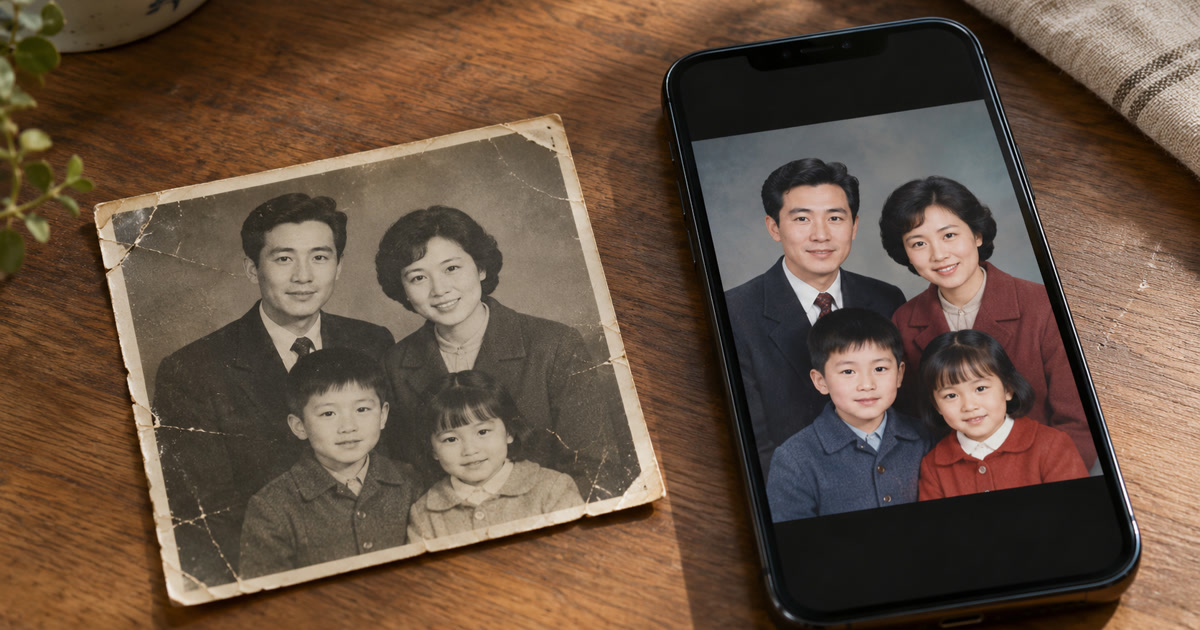
Same photo, forty-some years and one crease later — and then again, a minute after that.
Key takeaways
- An AI photo app instead of paying for professional restoration can fix the crease and the fading convincingly, but the colorization is a guess, not a fact — the AI picked plausible colors based on patterns it's learned, not the actual colors that were there in 1968.
- The emotional part wasn't really about the technology at all. It was seeing a familiar photo look "whole" again, which hit differently than I expected going in.
I wasn't planning to write about this one. I was cleaning out a closet, found a small stack of old prints in an envelope, and one of them — my grandparents, sometime in the late 1960s from the look of it — had a bad water stain across the bottom third and had faded to almost sepia. I scanned it on a whim, mostly curious whether an AI photo app could actually do anything with something this far gone.
What was actually wrong with it
Worth describing honestly, since "restore an old photo" undersells what these photos usually look like: a diagonal water stain had bleached out a chunk of the bottom section, there was a soft crease running through my grandfather's shoulder, and the whole thing had shifted toward a flat brownish tone the way old prints do. It wasn't torn, just tired — faded, stained, and soft everywhere it should have been sharp.
What I actually did
I scanned it at the highest resolution my scanner app offered, then ran it through the art-redraw style restoration pass in Movcl rather than my usual template-based photo edits — a different use of the same underlying technology, pointed at cleaning up and reinterpreting an existing photo rather than restyling a selfie. It handled the crease and the water stain convincingly, smoothing them into the surrounding texture instead of leaving an obvious patch. Then I tried the colorization pass, mostly out of curiosity about whether it would look natural or obviously artificial.

The part that actually surprised me
The restoration itself was impressive in the way I expected it to be — I'd seen "before and after" posts of this exact kind of thing before. What actually surprised me was realizing, partway through, that the color version wasn't true in any real sense. My grandmother's cardigan came out a soft blue. It might have been blue. It might not have been. Nobody currently living remembers, and the AI didn't know either — it produced a color that was statistically plausible for that kind of garment in that era of photography, not a documented fact recovered from the image. Once I noticed that, I couldn't unnotice it, in a way that changed how I looked at the whole restored photo.
There was a smaller version of the same thing with detail: I know that photo well enough to remember a small pin my grandmother used to wear, and in the restored version it had softened into an indistinct blur — not wrong, exactly, just less specific than the original, in the same way a hard crease and a busy background pattern would confuse any restoration tool trying to fill in damaged detail. If I hadn't already known to look for it, I wouldn't have noticed it was gone.
The AI didn't recover the photo's original colors. It made a very good guess and asked me to believe it.
The part that had nothing to do with the technology
Here's the thing I didn't expect going in: the emotional weight of the whole exercise had almost nothing to do with how good the restoration was. It was seeing the photo look "complete" — undamaged, present, in front of me — after years of it sitting faded and stained in an envelope. That reaction would have hit the same way with a much rougher restoration. The AI just happened to be the reason I looked at that photo properly for the first time in a long time, and that part surprised me more than any technical detail did.
The one thing I'd tell anyone trying this
Keep the original. I scanned mine at high resolution and put the physical print back exactly where it was, water stain and all. The restored, colorized version is something I made from that photo — a plausible, good-looking interpretation — not a more accurate copy of it. Treating it as historical fact rather than an artistic guess is the one mistake worth actively avoiding here, especially with details like exact clothing colors or small objects that the restoration process has to fill in rather than genuinely recover.
If you want to try this yourself
- Scan at the highest resolution available — more original detail gives the tool more to actually work with, rather than guess at.
- Use even, natural light with no glare if you're photographing rather than scanning — a flat, direct shot beats an angled one with a reflection across it.
- Try more than one pass if the app allows it — I got a noticeably better result on my second attempt just from a slightly different crop.
- Never delete or discard the physical original — a good scan plus the restored version is the goal, not a replacement for the print itself.
- Hold onto some healthy skepticism about the colors specifically — treat them as a nice guess, not a documented fact, especially if you're sharing the photo with family who might take it more literally than you did.
Frequently asked questions
Is AI photo colorization historically accurate?
No. AI colorization is an educated, plausible guess based on patterns learned from other photos, not a factual record of the original colors. It's worth treating the result as an artistic interpretation rather than historical fact, especially for details like exact clothing or object colors.
Should I get rid of the original photo after restoring it digitally?
No — keep the physical original regardless of how good the digital restoration looks. It's the only true, unaltered record of the photo, and a good high-resolution scan of it is worth having even after you've made a restored version.
What's the best way to scan an old photo before restoring it with AI?
Scan at as high a resolution as your scanner or phone camera app allows, in even, natural light with no glare, and avoid cropping or compressing the file before uploading it — more original detail gives the AI more to work with.