


AI Halloween Costume Ideas: See Yourself in 20 Looks Before You Buy
I've bought too many costumes that looked great on the model and weird on me. This year I tried every idea on my own photo first. Here are the 20 looks worth previewing, and how to do it.
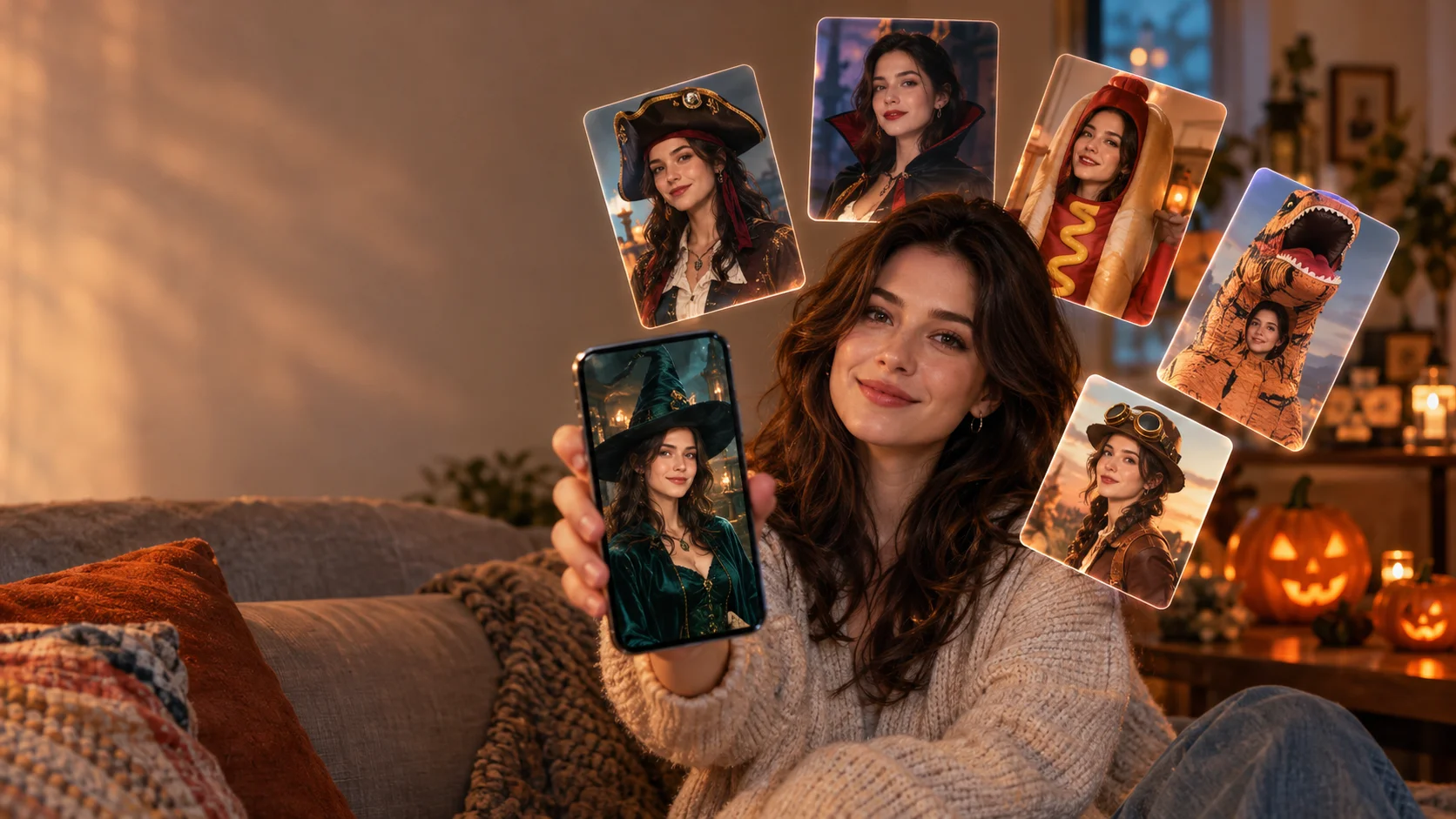
The Halloween I've been looking forward to is coming soon! I scroll through Halloween costume ideas for a week, fall for something, order it, and then try it on two days before the party and realize the color washes me out, the wig makes my face look tiny, or the "sexy pirate" is mostly polyester and regret.
This year I did it backwards. Before I put anything in a cart, I uploaded one selfie to an AI photo app and ran it through a stack of costume looks: witches, pirates, a zombie, a hot dog, an inflatable T-rex, the works. Twenty looks took me about half an hour on the couch. Three of my "definitely" picks got cut immediately. One I never would have considered became the winner.
Below are the 20 costumes I'd tell any friend to preview, grouped by vibe, with notes on budget, effort and what to watch for in the AI preview. Then I'll walk through exactly how I did it, and where AI previews are honestly not enough.
The short version
- An AI preview is best for judging color, vibe and silhouette on your actual face. It can't judge fit, fabric or sizing.
- Preview more looks than you think you need. The fun of it is discovering the costume you wouldn't have picked.
- Use a well-lit, front-facing photo. Bad input means a misleading preview.
- Pick an app that doesn't train on your photos. Movcl doesn't, and it starts with a free trial.
All 20 looks at a glance
Budget uses a simple scale: $ means you can mostly DIY it from your closet, $$ is a standard store-bought costume, and $$$ means a full set with accessories, quality makeup or a specialty piece like an inflatable.
| # | Look | Vibe | Budget | Best for |
|---|---|---|---|---|
| 1 | Classic witch | Spooky-classic | $ | Any party, last-minute |
| 2 | Glam modern witch | Spooky-classic | $$ | Night out, photos |
| 3 | Pirate captain | Spooky-classic | $$ | Couples, groups |
| 4 | Vampire aristocrat | Spooky-classic | $$ | Costume parties |
| 5 | Zombie | Scary | $ | Haunted houses, makeup lovers |
| 6 | Creepy porcelain doll | Scary | $$ | Photos, adult parties |
| 7 | Plague doctor | Scary | $$ | Low-makeup scary |
| 8 | Grim reaper | Scary | $ | Group "death squad" |
| 9 | Hot dog | Funny | $$ | Office party, dog-owner matching |
| 10 | Taco | Funny | $$ | Food-themed groups |
| 11 | Garden gnome | Silly | $ | Families, groups of any size |
| 12 | Rubber duck | Silly | $$ | Kids' events, low-key parties |
| 13 | "Retired grandma" | Silly | $ | Zero budget, maximum laughs |
| 14 | Inflatable T-rex | Inflatable | $$$ | Viral videos, outdoor events |
| 15 | Inflatable alien abduction | Inflatable | $$$ | Optical-illusion photos |
| 16 | Inflatable sumo wrestler | Inflatable | $$$ | Pairs, party games |
| 17 | Original caped superhero | Cosplay | $$ | Families, kids |
| 18 | Anime-style warrior | Cosplay | $$$ | Conventions, photo shoots |
| 19 | Steampunk explorer | Cosplay | $$ | Themed events, layering |
| 20 | ChatGPT costume | Trend | $ | Tech crowds, DIY fans |
Spooky classics: witches, pirates and vampires
These are the costumes that never really leave. They're also where an AI preview pays off most, because there are so many variations on the same idea.
1Classic witch
- Budget: $
- Effort: low
- DIY-friendly
Black dress, pointed hat, maybe a broom. Witch costumes are the most forgiving Halloween costume there is, and you probably own half of one already. The question is which version: storybook green-skin witch, cozy cottage witch, or plain black and a great hat.
Preview tip: Run two or three hat shapes. A tall, narrow hat and a wide floppy brim change your face shape more than you'd expect.
2Glam modern witch
- Budget: $$
- Effort: medium
- Great for photos
Velvet, deep plum or emerald, dramatic makeup, layered jewelry. When people search for costumes witch-style for a night out, this is usually what they mean. It's the same idea as #1 but styled like an outfit rather than a costume.
Preview tip: This is where color testing matters. Compare black, plum and emerald on your skin tone before committing to a dress.
3Pirate captain
- Budget: $$
- Effort: medium
- Works for groups
Pirate costumes are easy to scale: one person in a full captain's coat, the rest of the crew in striped shirts and bandanas. A tricorn hat, a sash and boots do most of the work.
Preview tip: Preview with and without the hat. Some people look more "captain" in just the coat and a headscarf.
4Vampire aristocrat
- Budget: $$
- Effort: medium
- Adults
High collar, dark red and black, pale makeup, a cape if you're feeling it. A vampire costume reads instantly and doesn't need fangs to work.
Preview tip: AI tends to make vampire skin very pale. Treat the preview as "full makeup" and decide whether you actually want to do that much.
Scary Halloween costumes (and properly creepy ones)
If your goal is to make someone flinch at the door, these are the scary Halloween costumes worth testing. Previewing helps here because scary looks depend heavily on makeup, which is hard to imagine on yourself.
5Zombie
- Budget: $
- Effort: high (makeup)
- DIY-friendly
Torn old clothes and good makeup. That's the whole recipe. The range is huge, from "slightly unwell office worker" to full gore.
Preview tip: Use the preview as a makeup reference. Save the version you like and bring it up on your phone while you paint.
6Creepy porcelain doll
- Budget: $$
- Effort: high
- Unsettling in photos
Frilly dress, rosy painted cheeks, a crack drawn across the face. It's one of the best Halloween creepy costumes because it looks sweet from across the room and wrong up close.
Preview tip: Check how the doll look works with your actual hair. If the preview needed a wig to land, factor that into the budget.
7Plague doctor
- Budget: $$
- Effort: low
- No makeup needed
The beaked mask, a long dark coat, a wide hat. Genuinely eerie, and you don't have to touch a makeup brush.
Preview tip: Since the mask covers your face, the preview is really about proportions. Check that the coat length looks right for your height.
8Grim reaper
- Budget: $
- Effort: low
- Group-friendly
A hooded black robe and a scythe. Cheap, recognizable, and it scales into a group costume instantly.
Preview tip: Try a version with a shadowed face and one with skull makeup. They give very different energy.
Funny and silly Halloween costumes
Funny Halloween costumes have one job: make people laugh when you walk in. Silly Halloween costumes are the gentler, all-ages version. Both are where I had the most fun previewing, mostly because seeing your own face in a hot dog bun is funny on its own.
9Hot dog
- Budget: $$
- Effort: low
- Office-safe
The undisputed king of funny costumes. Bonus points if you match with a dachshund.
Preview tip: Food costumes are big foam shapes. Look at whether your face still reads clearly through the opening.
10Taco
- Budget: $$
- Effort: low
- Good for groups
Pairs well with a friend dressed as hot sauce or a lime. Group food costumes always photograph well.
Preview tip: If you're planning a group, preview everyone's look (with their permission) and line the images up side by side.
11Garden gnome
- Budget: $
- Effort: low
- Families
Pointed red hat, fake beard, belt, done. One of the easiest silly costumes to scale across a whole family.
Preview tip: Test beard length. A short beard looks costume-y; a long one looks committed.
12Rubber duck
- Budget: $$
- Effort: low
- All ages
Bright yellow and impossible to dislike. A good pick when you want cute rather than clever.
Preview tip: Bright yellow is hard on some skin tones. This is exactly the kind of thing to check before ordering.
13"Retired grandma"
- Budget: $
- Effort: low
- Closet costume
Cardigan, reading glasses on a chain, curlers, a tote bag full of hard candy. It costs almost nothing and gets a laugh every time.
Preview tip: Ask for gray hair in the preview. Seeing your face with a grandma perm is half the fun and helps you decide on a wig.
Inflatable costumes: preview before you inflate
Inflatable costumes are the most expensive look on this list to get wrong, which makes them the best candidates for a preview. They're also huge, so the preview tells you more about the photo moment than about the experience of wearing one.
14Inflatable T-rex
- Budget: $$$
- Effort: low
- Viral-video energy
The inflatable costume that started the whole trend. It's instantly funny, especially when it tries to do anything with its tiny arms.
Preview tip: Your face often isn't visible in a T-rex. Preview it as a full-body shot to see the scale next to a doorway or a friend.
15Inflatable alien abduction
- Budget: $$$
- Effort: low
- Optical illusion
The "being carried off by an alien" illusion. It's ridiculous in photos and confusing in person, which is the point.
Preview tip: Illusion costumes depend on posture. A front-facing standing photo works much better than a selfie for this one.
16Inflatable sumo wrestler
- Budget: $$$
- Effort: low
- Best in pairs
Two of these at one party is guaranteed entertainment. Buy them as a pair or not at all.
Preview tip: Before ordering any inflating costume, check the listing for inflated dimensions, fan type and battery. The preview won't tell you any of that.
Cosplay costumes and superhero looks
For superhero Halloween costumes and cosplay costumes, I stuck to original designs and general styles rather than specific franchise characters. It's also easier to preview, because you're deciding on a style rather than chasing an exact replica.
17Original caped superhero
- Budget: $$
- Effort: medium
- Kids and families
Pick your own color scheme, an emblem and a cape. Inventing your own hero is half the fun, especially with kids.
Preview tip: Try three color combinations. Superhero suits live or die on color contrast.
18Anime-style warrior
- Budget: $$$
- Effort: high
- Conventions
Armor pieces, dramatic hair, a prop weapon (check your venue's prop rules first). This is serious cosplay territory.
Preview tip: Run an anime-style redraw of your photo as well as a realistic costume preview. If you love the anime version, that tells you which details to prioritize.
19Steampunk explorer
- Budget: $$
- Effort: medium
- Easy to layer
Goggles, a vest, brass accessories, a leather bag. It's built from layers, so you can start small and keep adding.
Preview tip: Preview a minimal and a maximal version, then buy the minimal one and add pieces if you have time.
The trend pick
20ChatGPT costume
- Budget: $
- Effort: medium (DIY)
- Tech crowds
Yes, people are dressing up as chatbots. The most common version is a white shirt or box designed as a chat window, with a "message" bubble you can rewrite on the night with a dry-erase marker. Some people add a fake "regenerate response" button. It's cheap, topical and an easy conversation starter.
Preview tip: This one is mostly a DIY build. Preview the overall shape (box versus T-shirt) and spend your energy on the jokes in the speech bubble.
How I previewed all 20 looks
You don't need to be good at writing AI prompts for this. Here's the exact process I used in Movcl:
- Pick one good photo. Front-facing, even light, nothing covering your face, shoulders visible. For inflatables and illusion costumes, use a full-body photo instead.
- Start with outfit change. Choose a costume-style template, or one close to the look you want, and apply it to your photo. This keeps your face and swaps the clothes.
- Use face swap for character-heavy looks. For looks where the styling carries the costume (vampire, porcelain doll, warrior), putting your face into a styled template gives a more complete picture.
- Try an AI redraw for cosplay. An anime-style redraw is a fun way to test cosplay ideas before buying armor.
- Save everything to one album and compare. Put your favorites side by side, then send the top three to a friend. Opinions come fast when they can actually see you.
What about ChatGPT or Gemini? Of course: upload a photo and describe the costume. That works well if you enjoy writing prompts. The trade-off is that results drift more between attempts, and your face can change slightly each time. A template-based app is faster when you want to run 20 looks in a row and keep your face consistent.
If your previews look off, the cause is usually the photo, not the costume. I covered the usual culprits in 5 mistakes first-time users make with AI face swap apps.
What an AI preview can and can't tell you
I want to be straight about this, because a preview is a decision tool, not a guarantee.
| The preview is good for | The preview can't tell you |
|---|---|
| Whether a color works with your skin tone and hair | Whether the size runs small or the fit is right |
| Overall vibe: cute, scary, funny, glam | How the fabric feels or how hot it gets |
| Silhouette and proportions on your body type | Real dimensions of an inflatable or a prop |
| Comparing several versions of the same idea | Whether the store-bought version matches the photo |
| Showing friends and getting a quick vote | How long the makeup takes or how it holds up |
The reason is how these models work. They generate a believable image of clothing on you, based on patterns learned from huge numbers of images, rather than simulating a specific garment's measurements. If you're curious about the mechanics, How AI understands clothing explains it in plain English. In practice: use the preview to choose the idea, then use the product listing, size chart and reviews to choose the actual costume.
A quick word on privacy
You're uploading a photo of your face, so it's worth thirty seconds to check where it goes. Look for a clear answer on whether the app trains its models on your photos and how long it keeps them. Movcl's position is that your photos are not used to train its models. I've written more about what to look for in Does this app train on your photos?
And if you're previewing group or couples costumes, ask your friends before uploading their photos. It's their face.
Try on your costume before you buy it
Upload one photo, run a few looks, and figure out what actually suits you. Movcl starts with a free trial, so your first previews cost nothing.
Get MovclFAQ
Can AI show me what I'd look like in a Halloween costume?
Yes. An outfit-change or face-swap app can put a costume look onto a photo of you in under a minute, so you can judge colors, vibe and overall silhouette before buying. It can't tell you how the costume fits, how the fabric feels, or whether a size runs small, so check the size chart and reviews before ordering.
What is an AI Halloween costume generator?
It's a tool that generates an image of you, or a character, wearing a costume, starting from an uploaded photo or a text description. General chatbots like ChatGPT and Gemini can do this with a prompt. Dedicated photo apps like Movcl use ready-made templates so you don't have to write prompts.
What are the most popular Halloween costume ideas this year?
Classic witch and pirate costumes stay near the top every year, alongside scary looks like zombies and plague doctors, funny food costumes, inflatable costumes like the T-rex, and generic superhero and cosplay looks. Trend costumes, like a ChatGPT costume built around a chat window, are also showing up as AI becomes part of everyday life.
Is it safe to upload my photo to an AI costume app?
It depends on the app. Look for a clear statement on whether your photos are used to train AI models and how long they're stored. Movcl states that user photos are not used to train its models. Only upload photos of other people with their permission.
Are inflatable costumes worth it?
For parties and photos, usually yes: they're instantly recognizable and funny. The trade-offs are bulk, heat, battery-powered fans and trouble with doorways, cars and bathrooms. Preview the look first, then check the inflated dimensions on the product listing before buying.