
How to Use ChatGPT to Make a Professional Headshot (and What It Can't Do for ID Photos)
A real headshot session costs $150 to $400. ChatGPT can get you surprisingly close from a phone selfie, if you understand what the model is actually doing to your face. Here's the mechanics, the prompts, and the rules you can't bend.
The short version
- Upload a sharp, evenly lit photo of yourself, then describe the headshot you want: wardrobe, background, lighting, framing.
- Always tell the model to preserve your facial features. It regenerates the whole image, so your face will drift if you don't.
- When a result is close but wrong, fix one thing per follow-up. When it has drifted, start over from the original photo.
- AI headshots are fine for LinkedIn, team pages, and speaker bios. They are not acceptable for passports, visas, or other government IDs.
Headshots and ID photos are two different jobs
People search for "AI headshot" and "AI ID photo" as if they're the same thing. They aren't, and mixing them up is how people end up with a rejected passport application.
A professional headshot is a flattering, intentional portrait. Its job is to make a good first impression on LinkedIn, a company site, or a conference program. Nobody checks it against a rulebook, so generative tools are a reasonable way to make one.
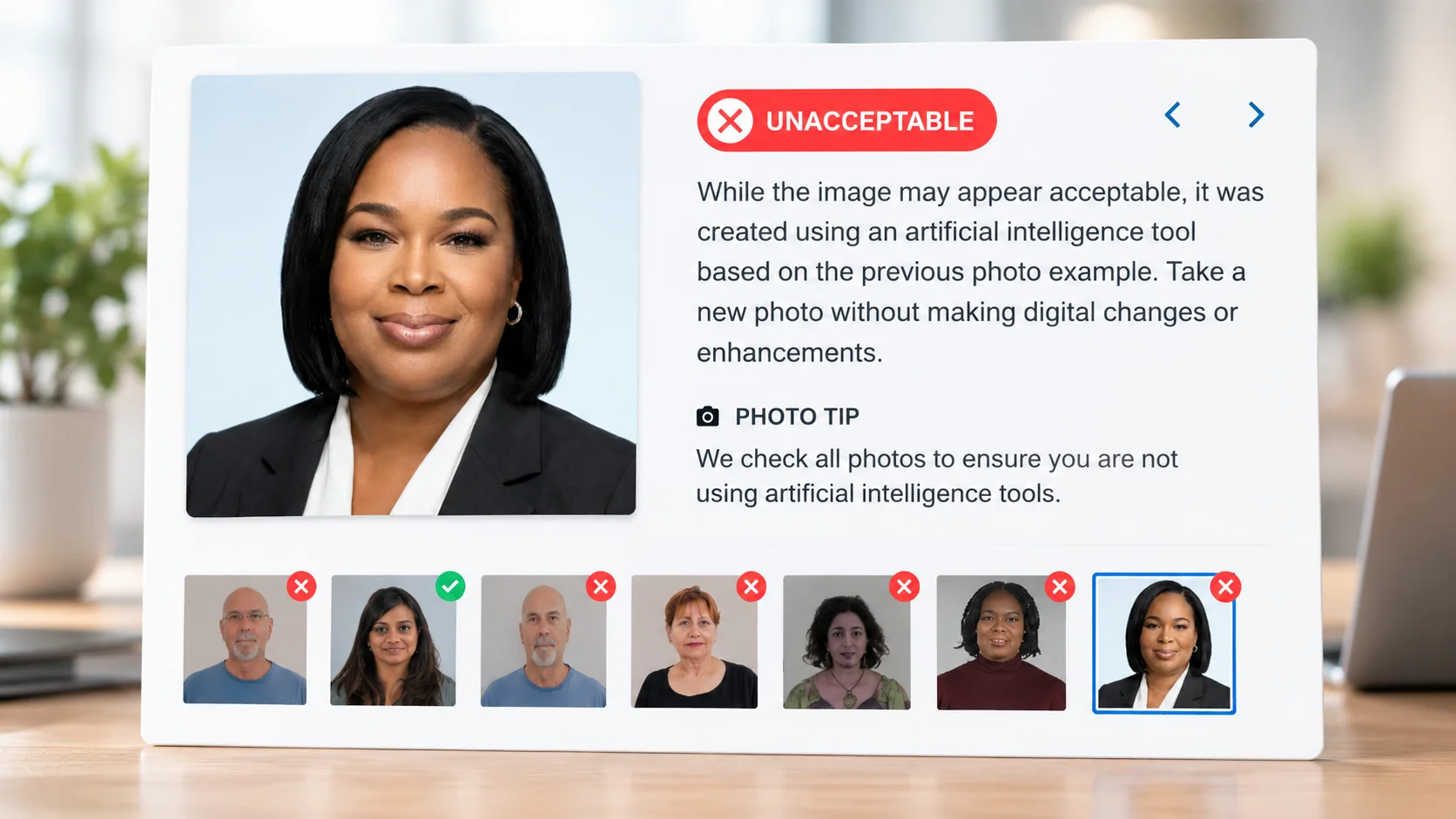
An ID photo is a verification document. Its job is to let a person or a face-matching system confirm you are you. Government agencies publish strict specs, and the big one for this topic is simple: the photo must be a true, unaltered image of your face. AI generation is, by definition, an alteration.
Don't worry. We will directly provide you with the prompt words that you can copy and paste directly. Keep reading!
How ChatGPT actually turns a selfie into a headshot
Understanding the mechanics explains almost every problem you'll run into, so it's worth two minutes.
It re-draws, it doesn't retouch
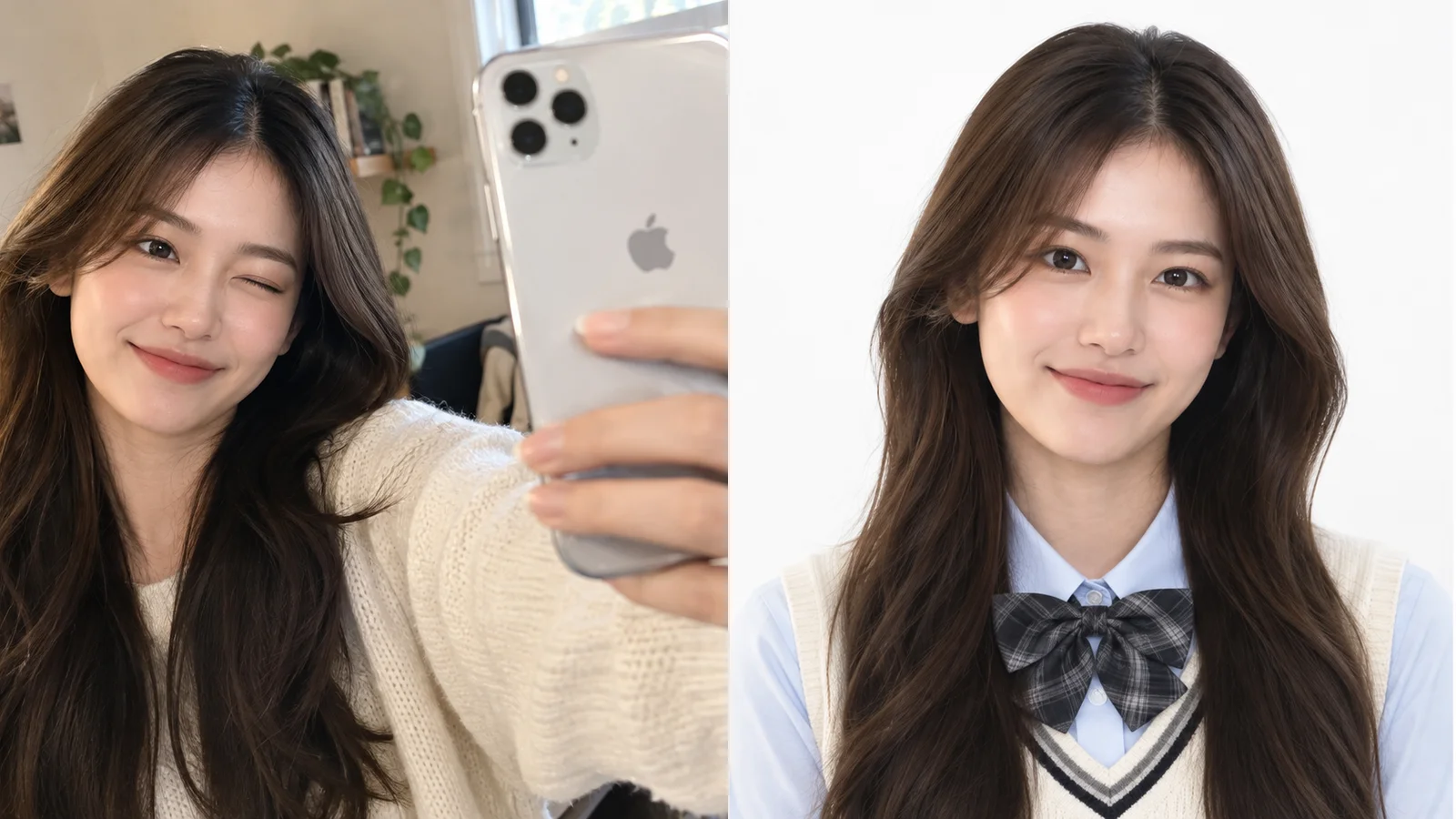
When you use Photoshop's healing brush, the software changes a few specific pixels and leaves the rest alone. ChatGPT's built-in image generation works differently. Your uploaded photo is converted into an internal representation, a compressed description of what's in the image: face shape, skin tone, hair, pose, lighting. The model then generates a brand-new image, guided by that representation and your text prompt.
That's why it can change your hoodie into a navy blazer and swap your kitchen for a studio backdrop in one step. It's also why your face comes back almost right: slightly different eyebrow arch, a subtly narrower jaw, teeth that are a bit too even. Nothing was copied. Everything was rebuilt.
Three ways to use it
| Mode | What you give it | What you get | Best for |
|---|---|---|---|
| Text-to-image | A written prompt only | A realistic person who is not you | Mockups, placeholder team pages, illustrated avatars |
| Image-to-image | Your photo plus a prompt | A new image that resembles you | Your actual headshot |
| Selected-area edit | A generated image plus a highlighted region and instruction | A change focused on that region | Fixing a collar, a stray hair, a background patch |
ChatGPT's interface lets you highlight part of a generated image and describe a change to just that area. In practice the model may still subtly shift the rest of the image, but it's far gentler than rerunning the whole prompt.
Why "professional" tends to look plastic
Image models learn from enormous numbers of photos, and a lot of images labeled "professional headshot" online are heavily retouched stock photography. So when you write "professional," the model leans toward that average: poreless skin, bright even teeth, a symmetrical face. Your natural asymmetries get smoothed away, which is exactly what makes a headshot read as AI. The fix is to name realism directly, and you'll see that built into every prompt below.
The photocopy problem
Each follow-up edit starts from the previous generated image, not your original photo. Small identity errors compound like a photocopy of a photocopy. After four or five rounds, you can end up with a stranger who has your haircut. Rule of thumb: two or three follow-ups maximum, then start a new chat and re-upload the original.
Pick the right source photo
The model can invent a blazer. It can't invent the details of your face that the photo never captured. Your source photo sets the ceiling for how much the result looks like you.
| Factor | What works | What to avoid |
|---|---|---|
| Lighting | Soft daylight facing a window, even on both sides of the face | Overhead light, harsh shadows, backlit against a bright window |
| Angle | Camera at eye level, face straight on or slightly turned | Low-angle selfies, extreme head tilt |
| Sharpness | In focus on the eyes, original resolution | Screenshots, compressed messaging-app images, motion blur |
| Framing | Head and shoulders, face filling a good part of the frame | Full-body shots where the face is tiny |
| Filters | Unfiltered camera output | Beauty filters or portrait-mode skin smoothing (the AI amplifies them) |
| People | Just you | Group shots, even if you crop later |
| Accessories | What you'd actually wear in the headshot | Sunglasses, hats, anything covering the eyes or hairline |
| Expression | A relaxed, natural smile or neutral face | Big laughs or squints; the model struggles to "undo" expressions cleanly |
The workflow, step by step
- Start a fresh chat. Old conversation context can bleed into the result. If you care about privacy, consider a temporary chat (more on that below).
- Upload your source photo. Use the original file from your camera roll, not a screenshot.
- Paste a full prompt, not a one-liner. "Make this professional" gives the model almost nothing to work with. Use one from the library below and adjust it.
- Judge the face first, everything else second. If the face doesn't look like you, don't bother fixing the tie. Regenerate or start over.
- Refine one thing per message. "Make the background a bit darker" works. "Darker background, smaller smile, different jacket, and fix the hair" usually breaks something.
- Use selected-area edits for small fixes. Highlight the collar or the stray hair instead of re-describing the whole image.
- Reset after two or three rounds. New chat, original photo, updated prompt that bakes in what you learned.
- Do the recognition test. Show it to someone who knows you without explaining. If they pause, it's drifted too far.
Anatomy of a strong headshot prompt
Every good headshot prompt covers the same eight components. You don't need fancy wording. You need all of them present.
| Component | Why it matters | Example phrasing |
|---|---|---|
| Identity lock | Counters face drift, the number one failure | "Keep my facial features, face shape, skin tone, and hairline exactly as in the photo." |
| Wardrobe | Sets the professional context | "Charcoal blazer over a white crew-neck shirt." |
| Background | Controls the overall tone | "Seamless medium-grey studio backdrop." |
| Lighting | The biggest single driver of "looks like a real photo" | "Soft key light from the left, gentle fill, subtle rim light on hair." |
| Camera and lens | Controls perspective and background blur | "Shot on an 85mm lens at f/2.8, eye-level." |
| Framing | Head-and-shoulders is the headshot standard | "Head and shoulders, centered, small space above the head." |
| Expression | Keeps you approachable without inventing a new smile | "Keep my natural expression" or "subtle, closed-mouth smile." |
| Retouch level | Stops plastic skin | "Natural skin texture with visible pores, light retouching only, no beauty filter." |
Add the output shape at the end: "square" for most profile photos, "vertical portrait" for a company bio page.
Prompt library: headshots from your photo
Each of these assumes you've uploaded your photo in the same message. Copy, then edit the bracketed parts.
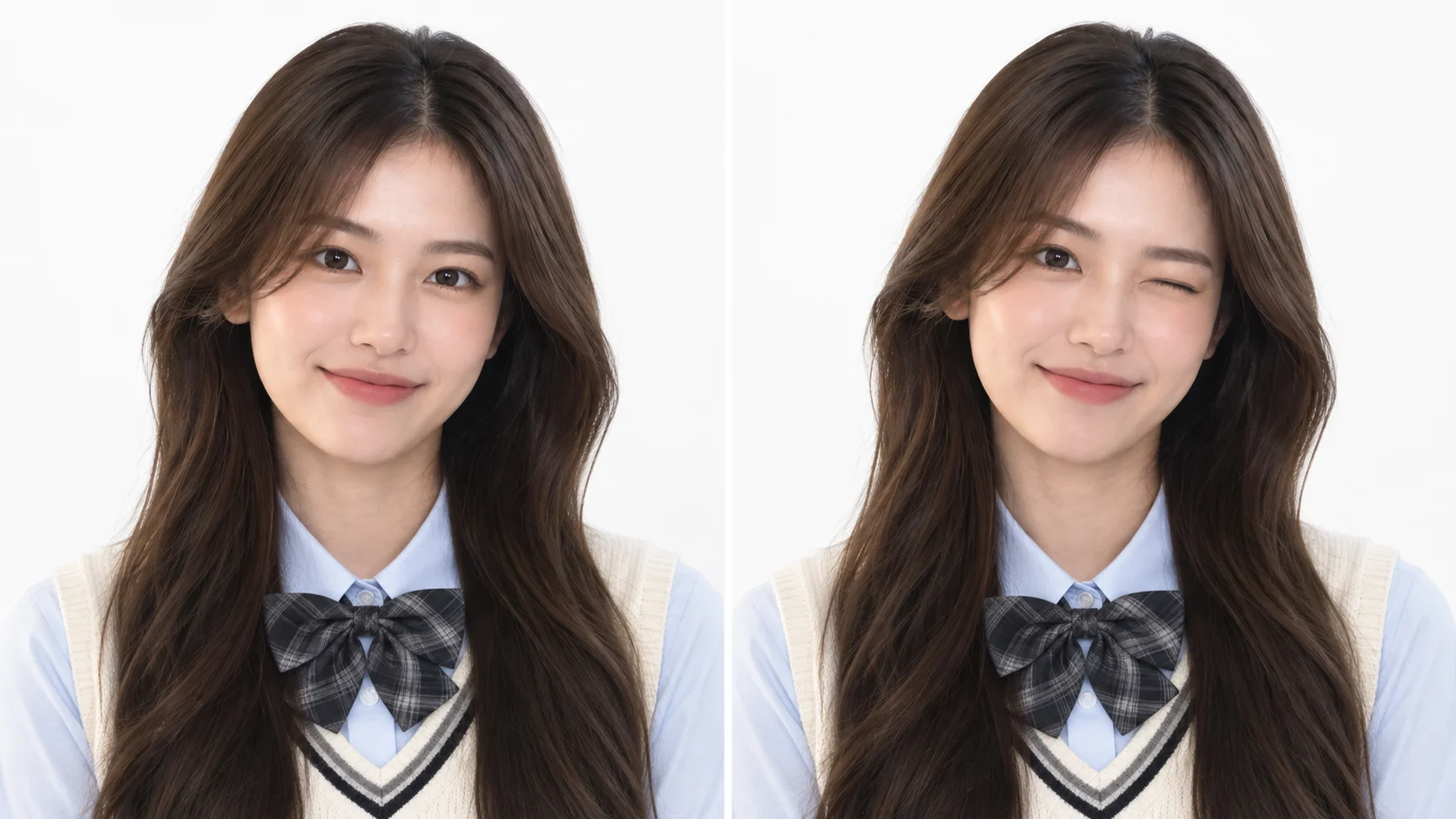
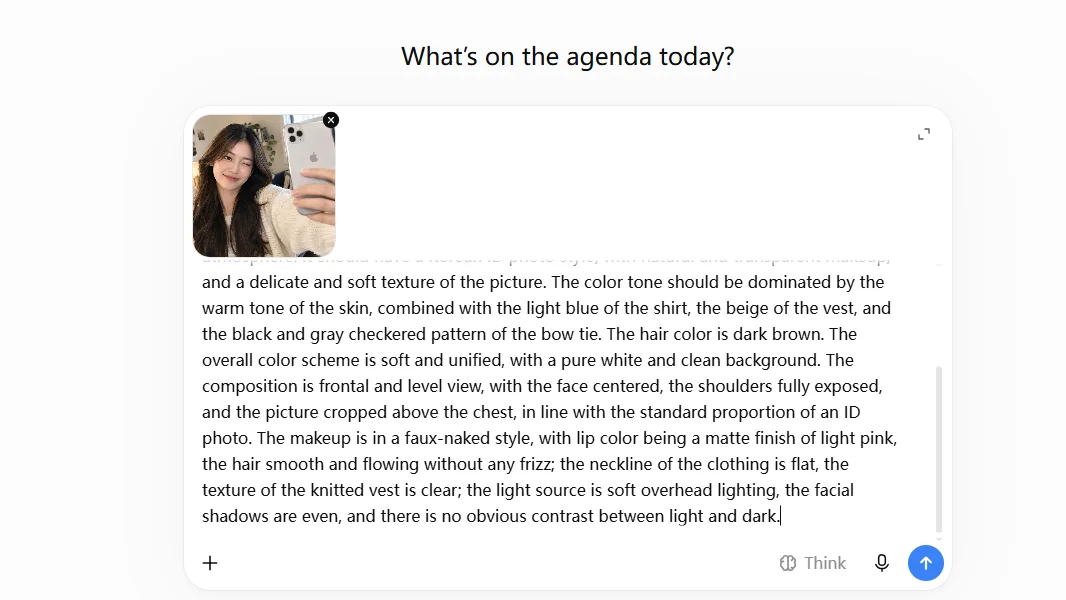
Keep the features of the person unchanged and modify the picture according to the following requirements: wear a light blue shirt and a light beige knitted vest (with black and gray contrast ribbons at the neckline), and pair it with a black and gray checkered bow tie. The photo should be taken in a pure white background with a ID photo style, without any extra decorations, highlighting the main figure and the fresh campus atmosphere. It should have a Korean ID photo style, with natural and transparent makeup, and a delicate and soft texture of the picture. The color tone should be dominated by the warm tone of the skin, combined with the light blue of the shirt, the beige of the vest, and the black and gray checkered pattern of the bow tie. The hair color is dark brown. The overall color scheme is soft and unified, with a pure white and clean background. The composition is frontal and level view, with the face centered, the shoulders fully exposed, and the picture cropped above the chest, in line with the standard proportion of an ID photo. The makeup is in a faux-naked style, with lip color being a matte finish of light pink, the hair smooth and flowing without any frizz; the neckline of the clothing is flat, the texture of the knitted vest is clear; the light source is soft overhead lighting, the facial shadows are even, and there is no obvious contrast between light and dark.
Turn the uploaded photo into a modern tech-company headshot. Preserve my exact facial features, skin tone, and hair. Outfit: [a plain navy crew-neck sweater] with no logos. Background: a bright, softly blurred modern office with plants and warm wood tones, out of focus. Natural window light from the side, soft shadows. 50mm lens look, shallow depth of field, chest-up framing slightly off-center. Relaxed, approachable, subtle smile. Realistic skin texture, no heavy retouching. Square format.
Create an outdoor professional headshot from the uploaded photo. Keep my face, features, and skin tone exactly the same. I'm wearing [a light blue button-down shirt]. Background: city park greenery in soft focus, late-afternoon golden-hour light coming from behind and to the side, with a soft reflector fill on my face. 85mm lens, f/2, head and shoulders. Natural expression, realistic skin with no smoothing. Photorealistic, vertical 4:5 format.
From the uploaded photo, create a headshot suitable for a medical practice website. Preserve all of my facial features and skin tone exactly. Wearing a clean white clinical coat over a [light grey] top, no name badge or text. Background: plain soft white-to-light-grey gradient. Bright, even, soft lighting with no harsh shadows, conveying warmth and trust. Head and shoulders, eye-level, 85mm lens. Gentle, reassuring expression. Natural skin texture. Square format.
Using my uploaded photo, create a warm, confident headshot for real estate marketing. Keep my face and features identical to the photo. Outfit: [a fitted navy blazer with an open-collar white shirt]. Background: a softly blurred bright residential interior with neutral tones. Bright, flattering, even lighting. Chest-up framing, slightly turned toward the camera. Friendly, genuine smile consistent with my natural expression. Photorealistic with natural skin detail, vertical 4:5.
Create a theatrical-style headshot from the uploaded photo. Preserve my facial structure, features, and skin tone exactly, including natural asymmetries. Simple dark charcoal textured backdrop. Dramatic but soft single key light from the side with a faint fill, creating gentle shadow on one side of the face. 85mm lens, f/2.2, tight head-and-shoulders crop. Plain dark [black] t-shirt. Neutral, direct gaze into the camera. No retouching beyond removing temporary blemishes; keep skin texture. Vertical 4:5.
From the uploaded photo, create a headshot for a university faculty page and conference speaker bio. Keep my face, age, and features exactly as in the photo. Wearing [a dark green cardigan over a collared shirt]. Background: softly blurred bookshelves in warm tones. Soft window light from one side. Head and shoulders, eye-level, 70mm lens look. Thoughtful, approachable expression. Realistic skin texture, light retouching only. Square format.
Convert the uploaded photo into a black-and-white editorial headshot. Preserve my exact facial features and hair. Plain mid-grey backdrop. Classic Rembrandt lighting with a soft triangle of light on the shadow-side cheek. Rich tonal range, fine film grain, natural skin texture. Dark, simple top. Head and shoulders, 85mm lens. Calm, confident expression. Square format.
Follow-up prompts for fixing a near-miss
Once you have a result that's 80% there, use targeted follow-ups. Always restate the identity lock, since each follow-up is a fresh generation.
| What's wrong | Follow-up prompt |
|---|---|
| Face doesn't quite look like me | "Compare this with my original photo. Restore my original eye shape, nose, jawline, and eyebrows. Change nothing else." |
| Skin looks plastic | "Keep everything the same but restore natural skin texture: visible pores, slight natural unevenness, no airbrushing." |
| Smile looks fake | "Return to the expression from my original photo. Don't change teeth or mouth shape." |
| Looks too young or too polished | "Keep my actual age. Retain fine lines and natural features from the original photo." |
| Background is distracting | "Replace only the background with a plain [light grey] studio backdrop. Keep me exactly as I am." |
| Clothes look wrong | "Change only the jacket to a [navy wool blazer] with natural fabric folds. Face, hair, and background unchanged." |
| Lighting feels flat | "Add a soft key light from the left and a subtle rim light on my hair. Keep my face and features identical." |
| Glasses have glare | "Remove the reflections from my glasses lenses so my eyes are clearly visible. Keep the frames exactly the same." |
| Crop is too tight or loose | "Reframe to head and shoulders with a little space above my head. Don't change anything else." |
Text-only prompts (when you don't need it to be you)
Sometimes you need a headshot that isn't of a real person: a placeholder for a website mockup, a sample for a design pitch, or an illustrated avatar for a community profile. Text-to-image is good at this. Just don't present the output as a real team member.
Photorealistic professional headshot of a fictional person for a website mockup: a woman in her 40s with shoulder-length curly dark hair, wearing a rust-colored blazer. Plain warm-grey studio background, soft even lighting, 85mm lens, head and shoulders, friendly subtle smile. Natural skin texture. Square format.
Create a clean illustrated avatar based on the uploaded photo. Keep my recognizable features: face shape, hairstyle, glasses, and skin tone. Flat vector style with soft shading, limited palette of [teal, cream, and navy], solid circular background. Head and shoulders, friendly expression. Suitable for a Slack or community profile.
ID photos: where AI is allowed and where it isn't
This is the part most "AI passport photo" tutorials get wrong, so let's be direct.
| Use | AI-generated OK? | Notes |
|---|---|---|
| US passport (book or card) | No | Must be an unaltered photo. Spec: 2 × 2 in, plain white or off-white background, head 1 to 1⅜ in tall, taken within 6 months, no glasses. |
| US visa / Green Card applications | No | Similar unaltered-photo rules; photos are checked by facial recognition. |
| Driver's license / state ID | No | Most states take the photo in person at the DMV anyway. |
| Company badge / internal ID | Check first | Some employers use badge photos for security verification. Ask HR or security before submitting. |
| Student ID | Check first | Often used for exam and building access. Follow your school's guidance. |
| LinkedIn, company website, speaker bio | Yes | As long as it's recognizably you. |
| Resume (US) | Usually skip | Most US employers prefer resumes without photos, to reduce bias concerns. |
What can you legitimately do for an official photo? Take a real photo that meets the spec from the start: stand a few feet in front of a plain white wall, face a window for even light, have someone shoot from about four feet away at eye level, and remove your glasses. Cropping a real photo to the correct dimensions is generally fine; changing your face, skin, or background with AI is not. For the legal side of using AI images of yourself more broadly, see Is It Legal to Use AI-Generated Photos of Yourself?
ID-style photo for where it's allowed
If your employer or a membership card explicitly accepts edited photos, this prompt produces a clean, spec-style result:
Using the uploaded photo, create an ID-style portrait for an internal company badge. Keep my facial features, face shape, skin tone, and hairstyle exactly as in the photo; do not beautify or reshape anything. Plain solid white background. Even, flat, shadow-free front lighting. Face straight toward the camera, both eyes open, neutral expression with mouth closed. Head and top of shoulders centered, head filling roughly 60% of the frame height. No glasses glare, no accessories covering the face. Square format.
Troubleshooting guide
| Problem | Likely cause | Fix |
|---|---|---|
| Face looks like a relative, not me | Weak identity lock, low-quality source photo, too many edit rounds | Better source photo, explicit identity lock, restart from the original |
| Waxy, airbrushed skin | "Professional" pulls toward retouched stock photos | Add "visible pores, natural texture, no beauty filter" |
| Weird teeth | Model re-invents the mouth | Use a closed-mouth source photo or ask for a closed-mouth smile |
| Hair halo or fuzzy edges | Background swap on fine or curly hair | Ask for "natural hair edges with individual strands," or choose a background close to your original tones |
| Mismatched earrings or collar | Small symmetrical details are hard to generate | Selected-area edit on just that detail |
| Random text or logos on clothing | Model filling in "brand-like" detail | Add "plain fabric, no logos, no text" |
| Lighting on face doesn't match the background | Original light direction conflicts with the new scene | State one light direction for everything, e.g. "window light from the left" |
| Image too small for print | Generated images are sized for screens | Fine for web profiles; for print, use a real photographer or a dedicated upscaler |
| Refuses to edit | Request may trip safety rules (e.g. a photo of someone else, or a minor) | Only edit photos of yourself, or of adults who've agreed |
The honesty test for AI headshots
An AI headshot is a presentation of you, not a replacement for you. A few practical guidelines keep it on the right side of that line:
- Recognizable at a glance. If a recruiter meets you on a video call, there should be zero surprise.
- Don't change what you are. Wardrobe, background, and lighting are fair game. Your age, weight, bone structure, and skin tone are not.
- Only your own face. Making "professional" photos of coworkers or anyone else without their consent crosses a line fast.
- Refresh it. A headshot should look like you now. Regenerate when your hair or look changes, just like you'd reshoot.
What happens to the photo you upload
Your face is biometric data, so it's worth knowing where it goes. Images you upload to ChatGPT are stored as part of your chat history. Depending on your settings, content you share may be used to improve OpenAI's models. At the time of writing, ChatGPT's data controls include an option to turn off model improvement, and temporary chats aren't saved to your history. Menu names change, so check your settings and OpenAI's current privacy policy rather than relying on any tutorial, including this one.
If you want the longer version of what to look for in any AI photo tool, we broke it down in Does This App Train on Your Photos? and AI Photo Apps and Your Privacy.
Where ChatGPT hits its limits
ChatGPT is a genuinely capable headshot tool, and for a one-off LinkedIn update it may be all you need. Its limitations come from being a general-purpose assistant:
- You're the prompt engineer. Getting a good result means writing, testing, and revising detailed prompts like the ones above.
- Consistency is manual. Want five matching headshots in different outfits? You'll be fighting drift across every generation.
- Plan limits apply. Image generation limits vary by plan, and iteration eats them quickly.
Dedicated photo apps take the opposite approach: the prompting is built into templates, and the whole product is designed around your one uploaded photo.
Want the outfit change without writing prompts?
Movcl is an AI photo app built around a single uploaded photo. Its outfit change feature swaps what you're wearing using ready-made templates, so there's no prompt to engineer, and your photos are never used to train our models. (Here's how AI outfit change actually works.) Start with a free trial on iOS or Android.
Frequently asked questions
Can I use a ChatGPT-generated photo for my US passport?
No. Passport photos must be unaltered. AI-generated or AI-retouched images risk rejection and delays. Take a real photo against a plain white or off-white background instead.
Why doesn't my ChatGPT headshot look exactly like me?
Because it re-renders the whole image instead of editing your original pixels. Use a sharp, evenly lit source photo, include an explicit instruction to preserve your features, and restart from your original photo rather than stacking many edits.
Is it okay to use an AI headshot on LinkedIn?
Generally yes, as long as it's recognizably you. Changing your clothes and background is normal; changing your face, age, or body is misrepresentation.
Do I need a paid ChatGPT plan?
Image generation has been available on free and paid tiers, but limits differ by plan and change over time. If you expect to iterate a lot, the lower limits on free accounts will be the constraint.
Does ChatGPT keep the photos I upload?
They're stored with your chat history, and your content may be used for model improvement unless you turn that off in data controls. Temporary chats aren't saved to history. Check OpenAI's current policy for specifics.
Can ChatGPT make a headshot without my photo?
It can make a realistic headshot of a fictional person from text alone. That's useful for mockups, but it isn't you and shouldn't be presented as a real person.